Clinical Imaging Australia Your Image Matters™ Book consult View pricing

Secure pre-launch pricing from $18,950 inc GST — limited spots available

Book a call
Get in touch
hello@clinicalimaging.com.au

Founded 2013  ·  Peer-reviewed protocol

Scroll

One system

The only system that shoots every indication.

Face, neck, body, dental, surgical — one calibrated setup, one standard, one record.

Every competing device is built around a single region. A face pod photographs faces. A dermatoscope reads lesions. Neither follows the patient to the body, the theatre, or the chair. Ours does — the same lighting, the same colour science and the same protocol across every indication your clinic treats, so a facial baseline and a body follow-up are captured to the same standard and live in the same record.

Face
Face
Neck  dcolletage
Neck & décolletage
Full body
Hands
Hands
Scalp & hair
Dental
Surgical & intraoperative
Phlebology
Phlebology
Dermatology  mole mapping
Dermatology & mole mapping
Non-surgical

One capture standard

Fixed lighting, fixed distance, fixed perspective — whatever the region.

One patient record

Face, body and surgical images filed together, not scattered across devices.

One purchase

No second system when your scope grows — the room already covers it.

Who we are

Standardising how clinics capture, store and share the truth.

Elevating the standards of clinical photography.

Clinical Imaging Australia builds standardised photography systems for aesthetic, cosmetic, dermatology, dental and plastic surgery practices. Designed for efficiency, flexibility and simplicity, each system is customised to the clinic — whether a solo injector, an experienced dermatologist, or a multi-practitioner surgery.

Dedicated small-form lighting means the time of day and ambient light changes have no effect on your images. No tripods, no umbrellas, no floor-space requirements. Pre-calibrated, with no photographic knowledge required. Tethered capture means no downloading, naming or cataloguing after you shoot — the image is filed against the patient before you put the camera down.

Fig Tethered capture in a live clinic — shoot, and the image is already filed against the patient.
  • Any part of the face, body or dental area. Cameras that autofocus effortlessly with eye-detection as standard, on a system that locks exposure, depth of field and perspective in place.

    Fig Courtesy Your Aesthetic
  • The next generation of analytical tools enhancing your existing photography system. From anywhere in the clinic, from any device — without double handling files. No downloads, no uploads, all in the cloud.

    Fig

    Explore Consult™ AI  →

  • Australian data centres, encrypted automatic backups, access from any device, and a keyworded database you can tag, track and analyse in real time. Inside Consult™, every member holds one of three roles, so viewers can read results without the ability to download, change or delete. See roles and permissions.

    Figure 4
    Fig
  • Patient records, consent and imaging sit inside the same workflow as DappleOS, Gentu, Xestro, Zenoti, Halaxy, Cliniko and Canva — no double handling, no separate login, no re-keying a patient's details twice. Capture in the room, and it's already filed where your team already works.

    DappleOSGentuXestroZenotiHalaxyClinikoCanva
    Figure 5
    Fig Courtesy Dapple

clinicalimaging.com.au  ·  Peer-reviewed methodology published in the Australasian Journal of Plastic Surgery (Callan & Wilson, 2021).

Explore

Where to start

  1. 01Why take proper images?Consultation · Regulation · Education
  2. 02The science of imagingResolution · Skin · Distortion
  3. 03Protocol sampleLevelling · Obliques · Data

Presented by Woodrow Wilson — Founding Director, Clinical Imaging Australia. Co-author, A standardised system of photography to assess cosmetic facial surgery, AJOPS 2021.

Your Image Matters™

Clinical Imaging Australia Pty Ltd  ·  ABN 58 606 095 934  ·  clinicalimaging.com.au

Why imaging mattersPlate 1

Every consultation matters.

An image that cannot be repeated cannot be compared. An image that cannot be compared cannot demonstrate anything.

Accuracy
Repeatability
Trust

Outcomes do not begin in the treatment room. They begin with trust, clear expectations and a patient who understands their own skin, and all three are built from what the patient can see. The consultation is where that happens, or where it does not.

Not to the patient. Not to a regulator. Not to you.

a
b
c

Fig . Consultation capture in three practices, same protocol. (a) Base Aesthetics. (b) The Aesthetic Edit. (c) Prejuvenation.

Stage a

Reveal

Filters expose the pigment, vascularity and sun damage the naked eye misses. That is your baseline, and it is undeniable.

Stage b

Target

A complete picture of the skin turns a generic recommendation into a specific, defensible plan. Depth matters. Every face is different.

Stage c

Monitor

Repeatable images at every stage. Progress stops being a feeling the patient has and becomes a fact you can both point at.

Petra Makin
Nurse
NQ Aesthetics

It allows me to effectively and accurately capture, analyse and manage our patients’ skin conditions, from the very first consultation.
Why imaging mattersPlate 2

You are in a heavily regulated space now.

Accurate, secure, consented. This protects your patients. It also protects your livelihood.

  • The Guidelines for advertising higher risk non-surgical cosmetic procedures now require real, unaltered images only: no airbrushing, no filters, no editing that could mislead, and no AI-generated or composite images presented as real outcomes. Where images are used, a “results may vary for other patients” warning is mandatory. Guidance is explicit that an ‘after’ photograph should be taken in similar conditions to the ‘before’. Standardised capture is now the only defensible way to meet that test.

    Ahpra advertising guidelines, September 2025

    Fig . Ahpra guidelines for advertising higher risk non-surgical cosmetic procedures, effective 2 September 2025.

  • A photograph from which a patient is reasonably identifiable is health information, and health information is sensitive information, attracting the strictest handling rules under the Australian Privacy Principles. Every health service provider is covered regardless of turnover. APP 11 requires reasonable steps to protect it from misuse, loss and unauthorised access. APP 8 governs any offshore storage. In Victoria, records are held for a minimum of 7 years from last entry, and for minors, until age 25. A camera roll is not a records system.

    Further reading. RACGP, Using personal mobile devices for clinical photos. Avant, Get smart with clinical images.

  • The Therapeutic Goods Act does not prohibit before-and-after photography. It prohibits advertising prescription-only (Schedule 4) medicines to the public, so an image becomes a problem when it names, implies or promotes the product, not because it is a before-and-after. Kept as a clinical record and used for information and education, your photographs are documentation. The distinction is what surrounds the image, not the image itself.

    “While the advertising of therapeutic goods is within the jurisdiction of the Act, it does not extend to the education of patients and clients, provided the information is non-promotional.”

a
b
c

Fig . Records captured to protocol and held against the patient file. (a) Injxu. (b) Medical Aesthetic. (c) Faceology RN.

Note

Capture is only half of the obligation.

Accurate, secure, consented applies to the whole chain: how the image is taken, where it lives, who can retrieve it, and whether you can prove any of it two years later. Clinical Imaging closes the capture half. Unaltered, repeatable, defensible at the point of the shutter. Secure, auditable storage closes the other half, aligned to your Ahpra and TGA obligations. Point and shoot at one end, an audit trail at the other. In between, the record defends itself, and it does not depend on which team member is holding the camera.

Ahpra & National Boards, Guidelines for advertising higher risk non-surgical cosmetic procedures, effective 2 September 2025; Ahpra media release, Putting patients first: new guidelines for cosmetic procedures, 2 September 2025.

OAIC, Taking photos of patients and Guide to health privacy; Privacy Act 1988 (Cth), APPs 3, 8 and 11; Health Records Act 2001 (Vic) s 10.2 (retention).

Therapeutic Goods Act 1989 (Cth) ss 42DL, 42DLA; Therapeutic Goods (Therapeutic Goods Advertising Code) Instrument 2021.

Not legal advice. Confirm your obligations for your profession, state and scope.

Paraphrased
Medical Journal of Australia
on consent and privacy

The better the photographs and the systems in place for their use and storage, the better the evidence for the practitioner. Poor photographs, with poor systems, do the opposite.
Why imaging mattersPlate 3

Marketing ≠ Education.
Education = Marketing.

Teach before you sell. Show, do not tell.

The argument

The regulator has removed the shortcuts. No testimonials, no influencers, no filters, no idealising. What is left is the one thing that was always the strongest anyway: showing your work and explaining it.

  • Your photograph is the primary visual aid for demonstrating what you can actually do. It is admissible where a testimonial is not, and under the current guidelines, imagery is permitted precisely because it is used for information and education. Make the image do the persuading and you stay inside the rules by construction.

    Fig . Courtesy Samara Aesthetics.

  • When you talk through what you are seeing, the OG curve, midface hollowing, submental laxity, the vascular map under the skin, you are demonstrating experience, anatomical understanding, and that you have heard the patient’s concern. That is education. Patients read it as competence, which is what actually drives their choice: qualifications and reputation consistently outrank advertising in surgeon-selection studies.

    Fig . Courtesy Symmetry Aesthetics.

  • Allergan Aesthetics’ 2026 consumer report found patients who receive a proper full-face consultation, walked through their own anatomy rather than told what to book, go on to treat three or more facial areas 65% of the time, against 23% after a single quick visit. And when patients were asked why they return to the same injector, the top answer was not price or convenience: it was trust in the practitioner’s ability. Standardised imaging is what lets you build that case. Every session, same conditions, laid out side by side.

  • 75% of providers report patients want to look natural, not different (Allergan Aesthetics, 2026). Galderma’s 2026 multinational survey of 280 patients and 162 injectors found the same demand from the other side of the needle: natural-looking, evidence-backed, repeatable results. A photograph is the only way to actually show “natural” rather than describe it, and the only way to prove, frame by frame, that it held.

  • Merz Aesthetics surveyed 15,000 adults who had had or were considering treatment: 68% said aesthetic procedures changed how they see themselves, 65% said it changed how confident they feel socially. That is the outcome your camera is actually documenting. Not just a nasolabial fold, but a decision the patient will judge you on for months. Photograph it like it matters, because to them, it does.

    Fig . Courtesy Merz Australia.

Allergan Aesthetics. What Consumers Really Want, 2026 consumer research report: “Consultation is Connection” and “Trust the Plan” findings (65% vs 23% multi-area treatment by consultation depth; trust cited as the leading reason patients return to an injector).

Galderma. Global anti-wrinkle treatment survey, 2026: 280 patients and 162 healthcare professionals across the US, Brazil, UK and China; natural-looking, clinically proven results as the leading driver of product adoption.

Merz Aesthetics. Global confidence study, 2026: 15,000 adults aged 21–75 who had undergone or were considering aesthetic treatment.

Ahpra, Guidelines for advertising higher risk non-surgical cosmetic procedures (2025): imagery permitted for the purposes of information and/or education; testimonials prohibited under s 133, National Law.

Your Image Matters™

Clinical Imaging Australia Pty Ltd  ·  ABN 58 606 095 934  ·  clinicalimaging.com.au

Science of imaging  ·  01

Resolution.

Detail matters.

Megapixels are the number everyone quotes. The number that actually decides how much skin detail survives is the size of the bucket each pixel sits in.

36 mm 22.3 mm Full frame — 36 × 24 mm 864 mm² sensor area APS-C — 22.3 × 14.9 mm 332 mm²  ·  the Clinical Imaging system (Canon EOS R10) iPhone 16 main — 8.1 × 6.1 mm 49 mm²  ·  1/1.56″ type, 48 MP at 1.0 µm DRAWN TO SCALE  —  7 PX PER MILLIMETRE

≈ 18×

Full-frame sensor area vs the iPhone 16 main sensor.

≈ 7×

APS-C sensor area vs the iPhone 16 main sensor — the working gap in your room.

≈ 14×

Light-collecting area of a single photosite: 3.7 µm (EOS R10) vs 1.0 µm (iPhone 16).

Fig Sensor formats drawn to scale. A 48 MP phone and a 24 MP camera are not comparable numbers — the phone is counting far smaller buckets.
  • A higher megapixel count only resolves more detail if the optics and the photosites can actually deliver it. A 10 MP phone sensor produces a materially lower-resolution image than a 10 MP DSLR sensor — same number, different physics.

    Fig
  • Larger photosites gather more photons, which means cleaner shadow detail, finer tonal separation across skin, and far less noise to hide fine texture, erythema and early pigment. This is why a 24 MP APS-C body at ISO 100 with a strobe out-resolves a 48 MP phone every time.

    ONE PHOTOSITE — THE BUCKET EACH PIXEL SITS IN 3.7 µm — APS-C 7 photons clean signal 1.0 µm — phone 2 photons noise fills the gap A 3.7µm well has ~14× the collecting area of a 1.0µm well.
    Fig
  • Computational photography — HDR stacking, multi-frame fusion, tone mapping, automatic white balance, skin smoothing — is not optional on a phone. Mobile cameras have been shown to produce substantial colour errors, and the same camera with different settings will render the same scene differently. That is a feature for holiday photos and a defect for a clinical record. Ahpra now requires images that are not enhanced or edited in ways that mislead; a device that silently enhances every frame is working against you.

    Figure 21
    Fig The Guardian

Apple, iPhone 16 technical specifications (48 MP Fusion main, 1/1.56″ type, 1.0 µm photosites). Canon EOS R10: APS-C 22.3 × 14.9 mm, 24.2 MP (≈ 3.7 µm photosites).

Ashique KT, Kaliyadan F. Clinical photography in dermatology using smartphones: an overview. Indian Dermatol Online J. 2015 — on equivalent megapixel counts producing unequal resolution.

Kunnath AT et al. Medical photography using mobile devices. BMJ 2022 — mobile device cameras shown to produce substantial colour errors.

Callan PP, Wilson W. A standardised system of photography to assess cosmetic facial surgery. AJOPS. 2021;4(2):8–21. doi:10.34239/ajops.v4n2.334

Science of imaging  ·  02

Documenting skin.

Skin health is the new wave — if you can capture it.

Skin is the one thing you can photograph, discuss, publish and market with the fewest restrictions — because you are documenting a surface, not promoting a scheduled medicine. And it is the one thing a phone cannot see properly.

Standard colour clinical capture
Move across the skin to reveal the filter
Fig Oxyhaemoglobin isolated in the dermis: diffuse erythema and vessel activity the standard photograph only hints at.

Don't limit your skin views to just the face. Document any part of the body with our system.

Standard colour clinical capture of the neck and décolletage
Move across the skin to reveal the filter
Fig Vascular render across the neck and décolletage: sun-related telangiectasia and diffuse erythema mapped as clearly as on the face.

And skin is where the argument gets settled. A patient does not remember how their cheek looked eleven weeks ago — they remember how they felt about it. A standardised capture converts that feeling into a fact. Same distance, same light, same frame: the only variable left is the treatment.

We adhere to the Monk Skin Tone Scale and accurately document all skin types.

Fig How we reveal what's under the skin: light penetration, the two chromophores, and what the filters mean for the patient.
  • Skin quality carries far fewer advertising restrictions than injectable outcomes. There is no Schedule 4 product in the frame, so the image can be shown, explained and taught from — which is exactly the ground the regulator has left open to you.

  • Melanin and oxyhaemoglobin absorb light at different wavelengths. A daylight-calibrated 5200 K strobe covers the oxyhaemoglobin peaks (415, 542, 577 nm) and the melanin range in the same exposure. Shoot RAW and those chromatic ratios survive intact — JPEG bakes in a tone curve and merges the two signals into an approximation.

  • Non-destructive filters isolate melanin and haemoglobin in the first ~2 mm of skin from a single standard capture — no second device, no second appointment, no extra time in the chair. The skin scan and the before-and-after are the same photograph.

“When treating pigmentation, depth matters… every face is unique.”

Anne Lam  ·  Aesthetics Practitioner, Symmetry Aesthetics

Science of imaging  ·  03

Distortion is ruining your results.

Your phone or iPad cannot take the same image twice.

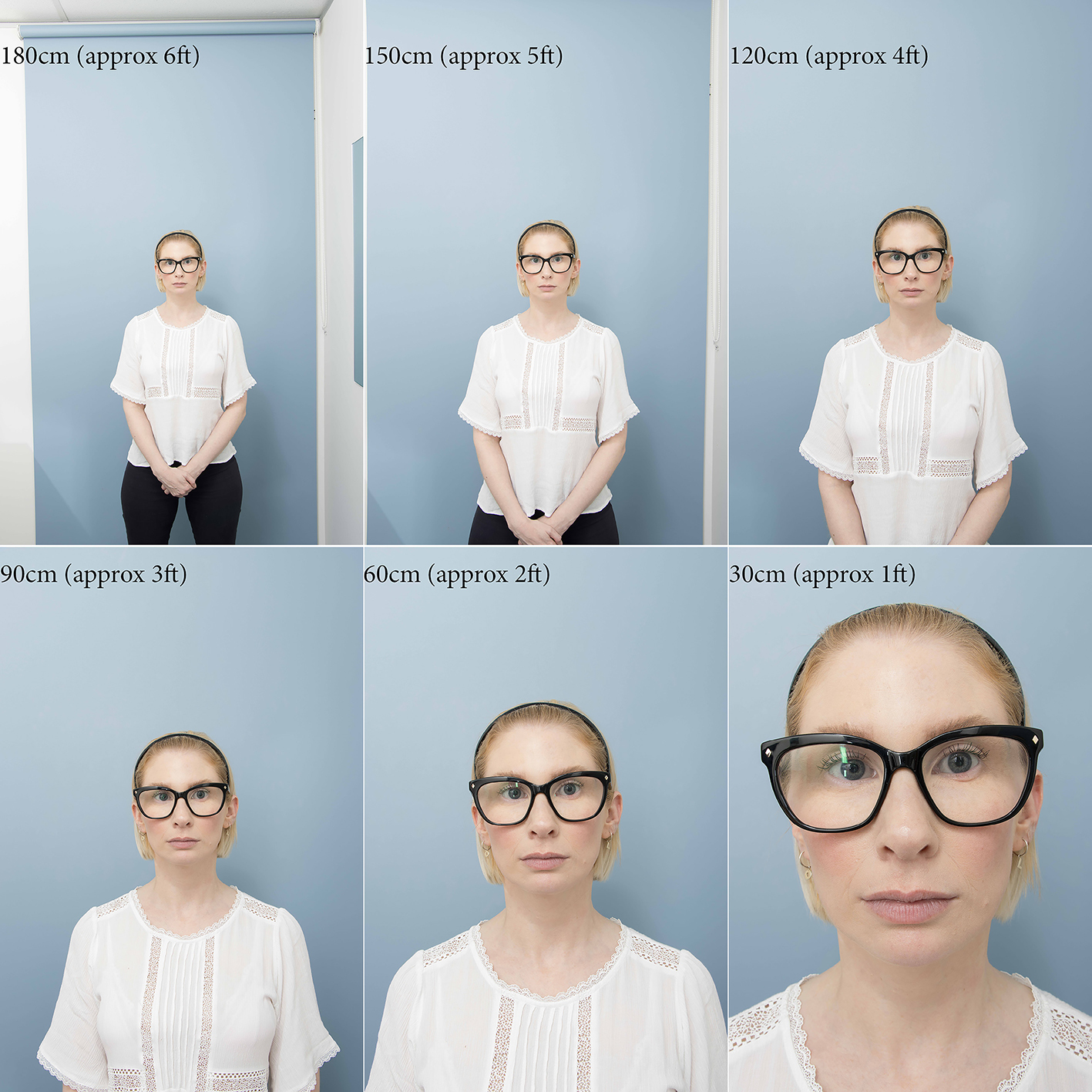
Perspective is not a property of the lens. It is a property of distance. Two photographs taken from different camera-to-subject distances can never be matched — no crop, no zoom, no edit will save them. This is the single most misunderstood point in the medical photography literature.

Take a photograph from 0.3 m and the nose is exaggerated and the ears vanish. Perspective distortion becomes noticeable inside 1 m. At 1.5 m it falls below 3.5%. Set your distance, mark the floor, and never move it again.

Perspective distortion at 0.3 m and 1.2 m
Fig Perspective (magnification) distortion at 0.3 m and 1.2 m. Distortion is noticeable once the ruler at the nose tip reads more than 5% larger than the ruler at the outer canthus. Callan & Wilson, AJOPS 2021, Fig 4.
24 mm lens at decreasing camera-to-subject distance
Fig One lens (24 mm), decreasing camera-to-subject distance. AJOPS 2021, Fig 7.
The same frames cropped to match framing
Fig The same frames cropped to match framing. They still cannot be matched — the distance changed, so the face changed. AJOPS 2021, Fig 8.
  • The closer you stand, the more you exaggerate whatever is nearest the lens. Under 1 m the nose and lips inflate and the ears recede — the “selfie effect”, quantified in the literature. Lock a camera-to-subject distance between 1.2 m and 3 m and mark it on the floor. Beyond 3 m the face begins to flatten. Choose once, then never vary.

  • Two direct light sources create unnatural shadows and erase real ones, altering the perceived depth of the face. One indirect, ceiling-mounted strobe bounced off white walls mimics the single light source our visual system evolved to read. Change the strobe-to-subject-to-background geometry and the exposure of the background shifts relative to the face — illumination falls off with the square of distance. The two images will never match.

    Figure 30
    Fig Via Instagram
  • Ambient light changes all day. At f/11 and 1/160 sec, ambient light is effectively eliminated and the strobe becomes the only light in the room — emitting a reliable 5200–5500 K white point every single frame. Your eye adapts white balance automatically; a sensor cannot. So you lock it, at 5200 K, forever.

Callan PP, Wilson W. A standardised system of photography to assess cosmetic facial surgery. AJOPS. 2021;4(2):8–21. doi:10.34239/ajops.v4n2.334 — figures reproduced under CC BY 4.0.

Ward B, Ward M, Fried O, Paskhover B. Nasal distortion in short-distance photographs: the selfie effect. JAMA Facial Plast Surg. 2018;20(4):333–335.

Fermández-Pellón R et al. Which lighting option is the best for photography in rhinoplasty? Facial Plast Surg. 2021;37(5):657–665.

Perspective distortion threshold (5% nose-tip vs outer-canthus rule): ICAO, Technical Report: Portrait Quality.

Figure 31
Fig Too blue
Figure 32
Fig Accurate skin tones
Figure 33
Fig Too yellow

Your Image Matters™

Clinical Imaging Australia Pty Ltd  ·  ABN 58 606 095 934  ·  clinicalimaging.com.au

Protocol sample  ·  01

Your camera has a built-in leveller.

Turn it on. Then level the patient to it, not the other way around.

A head that is tilted, rolled or turned cannot be compared to one that isn't. Tilt the head back and you gain tarsal platform show; tilt it down and you gain scleral show. Neither has anything to do with your injecting.

Y axis tilt, front view, middle image neutral
Fig Y-axis tilt (pitch), front view. Middle frame is neutral. AJOPS 2021, Fig 12.
Y axis tilt, side view, middle image neutral
Fig Y-axis tilt (pitch), side view. Watch what happens to the neck, the jawline and the nostril show. AJOPS 2021, Fig 13.
  • The lens barrel should be parallel to the floor and to the wall, and at the level of the subject's eyes. Turn on the camera's electronic level and use the same gridline every time. Camera roll can be corrected by cropping later; pitch and yaw cannot.

    Fig
  • The Frankfort horizontal plane — the line from the superior margin of the external auditory meatus to the inferior orbital rim, held parallel to the floor — is the classical reference. It is a good yardstick, but honest about its limits: the meatus is only visible in oblique and lateral views, and the infraorbital margin isn't visible on everyone.

    Figure 37a
    Figure 37b
    Fig a · b
  • At that same locked position, take a full smile. That single extra frame lets you read the gonial angle, the Ricketts line, and submental skin laxity under dynamic load — and gives you a matched animation pair for the review appointment. Relaxed and animated views must be equivalent between sessions, or the comparison is worthless.

    Figure 38
    Fig Courtesy Galderma

Callan PP, Wilson W. AJOPS. 2021;4(2):8–21 — point of view, head position in x/y/z axes.

Zhang C, Guo X, Han X, Tian Y, Jin X. Six-position, frontal view photography in blepharoplasty: a simple method. Aesthetic Plast Surg. 2018;42(5):1312–1319 (Frankfort plane).

Rhee SC. Aesthetic Plast Surg. 2017;41(2):461–465 (PSA line). Prantl L, Brandl D, Ceballos P. Plast Reconstr Surg Glob Open. 2017;5(8):e1389 (NETWORK line).

Sommer DD, Mendelsohn M. Pitfalls of nonstandardized photography in facial plastic surgery patients. Plast Reconstr Surg. 2004;114(1):10–14.

Protocol sample  ·  02

Shooting obliques.

Stop measuring the angle. Start reading the face.

  • Nobody can reproduce “45 degrees” by eye, and the number tells you nothing about what you can actually see. Our own testing found 45° is too far — somewhere between 35° and 40° is preferable if it can be replicated. The point is replication, not protractors.

    Fig Courtesy Juv’ae
  • This is the endpoint that works: rotate the patient to three-quarters until both medial canthi are just visible. It is an anatomical stop, not an estimate — anyone in your clinic can hit it, and it gives you the same view every time.

  • The oblique is the view that reveals what you actually treat: the ogee curve, midface hollowing, malar projection, and the contour transitions the front view flattens out completely.

    Figure 45
    Fig Courtesy Galderma
  • Take the full smile at that same oblique. The dynamic frame is where midface support, cheek recruitment and perioral tension actually show themselves.

Callan PP, Wilson W. AJOPS. 2021;4(2):8–21 — “We have found that 45 degrees is too much of an angle… somewhere between 35 and 40 degrees is preferable if it can be replicated between sessions.”

Figure 42
Fig Courtesy Juv’ae
Figure 43
Fig Courtesy Juv’ae

Protocol sample  ·  03

Leverage technology for efficiency, analysis and data.

Your clinic is a universe of data.

You are already generating it. Every capture carries a patient, a date, a procedure and a region. Tag it at the point of capture and your image library quietly becomes your business intelligence.

Our AI tools give you real-time reports on your clinic traffic.

Navigate Keywords are integrated into the system so you can tag, track and analyse your database in real time. Click the header above to collapse or reopen this panel.

Real numbers, real installs

This isn't hypothetical. Two live Clinical Imaging installs — a two-injector clinic and a seven-dermatologist practice — already run this analytics layer. Here's what their own keyword-tagged image data shows.

42%

Repeat-visit rate — 2-injector QLD clinic, 18 months

1.7%

Complication rate across 10,930 appointments, 7-dermatologist practice

3.6×

Appointment growth 2019–2024 — 730 to 2,610 a year, same practice

The tagged data also exposes the rhythm you'd otherwise be guessing at: the QLD clinic's busiest block is 10am–12pm on Thursdays, and Excel V+ (vascular, pigment, scar) accounts for roughly 34% of all bookings. At the dermatology practice, injectables alone make up 53% of the treatment mix, and the busiest single hour, every week, is 10am on a Wednesday. None of that comes from a survey — it's sitting inside images your team already captured, the moment you keyword them.

Source: clinicalimaging.com.au — “Understanding analytics on your clinic”. Figures drawn from de-identified, aggregated appointment data across two Clinical Imaging installations.

  • Tethered capture means no download, no renaming, no cataloguing. The image lands filed against the patient before you put the camera down. Australian data centres, encrypted automatic backups, access from any device, multiple rooms and multiple sites. That isn't convenience — under APP 11 it is the “reasonable steps” test, and it is what a camera roll cannot survive.

  • Your business traffic is hidden inside your images. Keyword every capture by procedure, region and date and you can answer questions you currently guess at: what is actually growing, which treatments are being repeated, where the revenue is concentrating, and which of last quarter's patients haven't rebooked. The database is already there. Tagging is what makes it readable.

  • The same standardised photograph that becomes the before-and-after also carries the analytical layer — skin quality scoring, facial ratios, lesion mapping over time. One capture, many indications. No second device, no second appointment, no extra time in the chair.

    Fig

Clinical Imaging Australia, Why are keywords vital? — keywords integrated into the system to tag, track and analyse the database in real time. clinicalimaging.com.au/newsblog/why-are-keywords-vital

Privacy Act 1988 (Cth), APP 11 (security of personal information) and APP 8 (cross-border disclosure); OAIC, Guide to health privacy.

Fig
Fig
Fig

Nurses using clinical imaging report that it lets them track a patient's progress at every stage — not just capture a single before-and-after, but watch a treatment plan actually working over time.

Paraphrased  ·  Petra Makin, Nurse, NQ Aesthetics

Your Image Matters™

Clinical Imaging Australia Pty Ltd  ·  ABN 58 606 095 934  ·  clinicalimaging.com.au

@clinicalimaging_systems

Your Image Matters™

Clinical Imaging Australia Pty Ltd  ·  ABN 58 606 095 934  ·  clinicalimaging.com.au

Competition

Eight reasons we win the comparison.

Canfield, Sylton Observ, VISIA — measured side by side.

Handheld capture on another system Other system
Filter not available
Clinical Imaging capture, fixed distance and calibrated lighting Clinical Imaging
Move across either image
The loupe shows both files at 100%. Ours resolves pores and individual vessels; the handheld frame softens into noise at the same scale. Drag the divider. Same patient, two systems: handheld on the left, fixed distance and calibrated lighting on the right. Perspective is a property of distance. A handheld camera close to the face magnifies whatever is nearest the lens and compresses what is further away; at 1.2 m the nose tip and outer canthus stay within the 5% rule, so the frame is repeatable next visit.
01

All-in-one, no bolt-ons

Face + skin + body in one system. Canfield needs separate VECTRA units per modality; Observ is skin-only — extra hardware for anything else. One SKU, one training session, one support line.

CLEON by Dr Brandon
02

Consult™ — zero-capital AI layer

Runs on existing hardware, no new purchase. Observ explicitly markets against AI scoring (“puts clinical judgement in the hands of the practitioner”) — a gap, not a strength, when 62% of dermatologists now use AI skin analysis. Consult™ carries ISO 13485 + ISO/IEC 27001 certification and 95.3% clinically-validated accuracy across 80 conditions. Neither competitor has a comparable AI diagnostic layer. Consult™ is a marketplace of AI tools — new modules land on the installed base as they ship.

03

Price

Elevate $18,950 inc GST vs Observ 520x $18,990, VISIA $25,200, VECTRA H2 $20–30K. We undercut every listed competitor at entry tier while matching or beating their feature set.

04

Proprietary software, open-source hardware

Canon R10/R7 + Elinchrom — industry-standard, openly available hardware, driven by our proprietary software. Canfield and Sylton run proprietary in-house hardware: repairs, replacements and second-source parts all route through them. Ours doesn't.

06

Data, analytics and compliance — hosted

We host the data, provide business analytics, and carry the compliance layer — capture through storage, audit-ready.

07

In-house developer

The platform is built and developed by our own in-house dev team — feature requests, integrations and fixes ship on our roadmap, not a vendor's.

08

Shoots any indication

Face, neck, body, dental, surgical — one calibrated setup, one standard, one record. Every competing device is built around a single region: a face pod photographs faces, a dermatoscope reads lesions. Neither follows the patient to the body, the theatre or the chair. Ours does — the same lighting, the same colour science and the same protocol across every indication your clinic treats, so a facial baseline and a body follow-up are captured to the same standard and live in the same record.

Packages  ·  02

Service & software plans.

Ongoing support, software & cloud — all plans include Consult.

Elevate

$150 / month

Essential tools for solo practitioners getting started with standardised clinical imaging.

Remotely installed — ships internationally

  • ✓Consult AI by Clinical Imaging
  • ✓Software licensing & updates
  • ✓Tablet syncing
  • ✓Unlimited AI analysis
  • ✓Email ticketing support
  • ✓Clinical Imaging Academy access
Most popular

Signature

$250 / month

For growing practices that need integrations, cloud storage and hands-on support.

On-site installation, nationwide

  • ✓Everything in Elevate
  • ✓2TB Microsoft cloud storage — Australian data centres
  • ✓Integration codes — Dapple, Gentu, Xestro, Cliniko or Canva
  • ✓Concierge support ticketing
  • ✓WhatsApp training group
  • ✓Mole analysis and skin condition screening
  • ✓Business analytics report
On-site storage vs cloud: the real 5-year costClinical image storage for one clinic, Australian pricing, 2026

On-site storage costs up to 2.6× more over five years — before counting downtime, drive failures and the person who has to look after it.

Signature plan

Storage, Consult software, support and training included

Monthly (per clinic)
$250
Hardware refresh
none
Off-site backup
included
Access
any device, anywhere
5-year total~$15,000

Business NAS

Synology/QNAP 4-bay, RAID 5

Upfront
$3,000–5,000
Monthly
(managed + backup)
$130–300
Hardware refresh
drives yr 3–4
Off-site backup
extra
Access
on-site / VPN
5-year total~$11,000–24,000

Dedicated Server

Dell/HPE tower, Windows Server

Upfront
$10,000–18,000
Monthly
(managed + BCDR)
$250–550
Hardware refresh
warranty ext. yr 4–5
Off-site backup
extra
Access
on-site / VPN
5-year total~$26,000–52,000

5-year all-in cost (midpoint)

Signature
$15k
NAS
$17k
Server
$39k

Managed IT benchmarks: $80–150 per device/month, $130–250/hr break-fix (Australian MSP pricing guides, 2026). Signature figure is the plan price of $250 per clinic per month, inc. GST, over 60 months. Estimates only; obtain quotes for your site.

★★★★★

We've been using the Clinical Imaging software system for the past 12 months and can highly recommend the quality and service. Woodrow and his team provide a comprehensive step-by-step process to ensure seamless onboarding and training. It has also elevated the quality of our consultations and treatment planning.

The White Room

All prices in AUD, inc. GST · Custom plans available on request.

Book a demo

Get started  ·  02

Less space than you think.

A minimum of 1.2m × 2.5m — often already sitting unused in your clinic.

We've installed in all sorts of room dimensions, and we confidently recommend a minimum size of 1.2m wide by 2.5m long. Room layouts are customised during the quotation process.

All that's needed is a 1m distance between the photographer and the patient. With our settings, no tripods, umbrellas or floor stands are required — the light source is ceiling-mounted, which means time of day won't alter the image.

A dedicated space isn't required either. Our installs are often in passages, cupboards or shared treatment areas.

Figure 83
Fig Minimum footprint — 1.2m × 2.5m, ceiling-mounted light, no dedicated room required.

Your Image Matters™

Elevating the standards of clinical photography.

A system quote, a room walkthrough, or your questions answered — reach out and we’ll come to you.

Order a system

hello@clinicalimaging.com.au   ·   0481 174 234

Your Image Matters™

Clinical Imaging Australia Pty Ltd  ·  ABN 58 606 095 934  ·  clinicalimaging.com.au

Questions, answered.

10 years of knowledge, client feedback and industry trends have led to the development of this new platform.

The system

  • A calibrated capture setup with a camera, lens, flash, positioning decals and a Kiosk 32" touchscreen. It comes with the Clarity capture app and Consult for patient consultations, secure cloud storage, setup and training. Each tier adds to the one below it: Elevate, then Signature, then Precision.

  • About 1.2 m × 2 m of clear floor with a plain wall behind the patient. Most clinics use an existing consult or treatment room. We confirm the layout with you before install.

  • A sparky gets the lighting done in 30min typically. Software 5min to install via app store, and onboarding 30min with one of our team members.

  • No. The system runs on its own tablet, and images sync to the cloud automatically.

    You can consult from any computer browser, instantly.

  • We have a range of cameras starting at 24mpx up to 45mpx.

  • Each clinic gets its own dedicated Microsoft 365 tenant. The data is encrypted in transit and at rest, access is role-based, and it is hosted in Australian data centres. No images are used for AI training. If you leave, we hand over your data and delete our copy within 30 days.

  • Yes. Standardised capture supports Ahpra's before-and-after advertising guidelines. Secure, access-controlled storage and a defined retention and deletion process support your APP 11 security obligations. Compliance remains the clinic's responsibility, and we give you the tools to meet it.

  • Training is by default done remotely, with in person training available at extra cost. Training at install covers setup, capture protocols, positioning and Consult. It is backed by video guides and ongoing support for new staff.

  • Yes. You can add satellite tablets for consult rooms, and multi-site groups share one library with consistent protocols across locations. Each room requires our ceiling mounted lighting solution for consistent images.

  • Cloud storage and hosting, software updates, remote support and hardware warranty and replacement. From month 13, hosting is $150/month on Elevate and $250/month on Signature.

  • Yes. We have internal financing where a 30% deposit gets you installed, with the balance split over 12 months.

    External financing for longer terms is facilitated through Medfin.

  • Contact support and we will troubleshoot remotely first. If hardware has failed, we ship a replacement under your plan within 7 business days.

  • Systems start from $18,950 inc GST at pre-launch pricing, normally $20,845 inc GST.

  • The new platform is tablet-native, faster to capture and doesn't need a PC or Lightroom. It adds Consult AI analysis and the latest tools with CRM level organisation.

    No servers to troubleshoot, no external IT agencies to wait on and lightning fast tablets with large screens.

    The upgrade plan for existing clients is $6,000 inc GST, with an extra room bundle at $6,500 inc GST.

  • At launch: Dapple, Gentu, Cliniko, Canva, Xestro and Healthcare Access.

  • Book a call, and we will review your current setup, recommend a package and ship the new system. Your existing image library migrates across with no data loss.

  • Yes. Consistent, standardised images make compliant before-and-afters, patient reports and social content easy to produce.

    That photo area also doubles as an e-commerce station where you can do headshots, product images and content for socials.

Consult™ AI

  • Consult™ is built on the full Clinical Imaging Australia platform. Core features include:
    • Pre-calibrated equipment for consistent, reproducible clinical photography
    • Minimal space requirements — designed for consultation rooms, not dedicated studios
    • Patient positioning markers and guidelines for standardised capture
    • High-resolution images suitable for clinical documentation and medico-legal records
    • Instant image viewing for in-room consultations
    • Secure sharing of files directly with patients
    • Remote file access from any authorised device
    • Easy file management across your clinic network
    • Creating branded before & after comparisons with your clinic logo
    • Comparing multiple images side by side
    • Cropping and zooming for detailed close-up review
    • Automatic cloud backups stored in Australia
    • Vascular lesion and pigmentation filters for clinical skin assessment
    • Organising treatments with keywords and tags
    • Compliance management and audit-ready documentation
    • Secure encrypted database with two-factor authentication
    • Tablet syncing for theatre and mobile use
    • Online education academy for clinical photography training
  • No — Consult™ is designed to elevate your consultations and clinical networking, not replace the desktop imaging experience you already rely on. Your existing Clinical Imaging Australia workflow remains exactly as it is. Consult™ sits alongside it as a browser-based layer purpose-built for the consultation room.
  • Yes. If you are an existing Clinical Imaging Australia hosted client, your current service agreement will be grandfathered into the Consult™ platform. You won't need to sign a new agreement or renegotiate your terms — your existing arrangement carries over.
  • All images and files are stored securely in your existing Microsoft SharePoint account. Nothing changes about your data storage — Consult™ accesses your SharePoint environment directly, with the same access controls, versioning, and backup procedures already in place. Your data remains in Australia.
  • Yes. Consult™ is fully browser-based and supports simultaneous multi-user access from any modern Mac or PC. There are no installs required — your team can log in from any consultation room, treatment suite, or remote location at the same time.
  • Quite a lot. Within Consult™ you can:
    • Create before-and-after comparisons
    • Annotate directly on images with drawings and markings
    • Type consultation notes directly onto images
    • Share images securely with patients
    • Auto-stamp your clinic logo on every image
    All annotations and notes are stored alongside the image record, visible to your whole team.
  • No — and this is important. The AI tools within Consult™ do not simulate, alter, or generate images. They analyse your existing clinical photographs to extract additional data and present it as a report or visualisation. What you see is derived from a real image of your real patient — not a filter, not a prediction, and not a rendered simulation. We use AI for good: genuine analysis and evidence-informed recommendations only.
  • The Consult™ marketplace currently includes:
    • Skin Analysis — generates a skin score, detailed report card, and visualisation of key conditions including texture, pigmentation, and hydration markers
    • Mole Tracking — monitors lesions over time using the clinical ABCDE system
    • Dental Analysis — assesses hygiene indicators and discolouration from intraoral or smile images
    • Business Analytics (Coming July 2026) — access key performance data on clinic traffic, treatment volumes, and appointment patterns
    All modules are optional. Activate only the tools relevant to your practice and indication mix.
  • Absolutely not. The AI marketplace is designed to provide additional data and objective analysis to inform your consultations — not to make clinical decisions on your behalf. Every output is a supporting tool. The diagnosis, treatment plan, and patient conversation remain entirely in your hands. Consult™ elevates the consultation; it does not conduct it.
  • Yes. Your clinic logo is automatically stamped on images within Consult™, so any image shared with a patient or used in a portfolio carries your branding. This happens without any manual steps.
  • Yes. Consult™ includes a secure patient sharing feature that allows you to send selected images directly to patients. This supports informed consent conversations, helps set realistic expectations, and improves treatment satisfaction — all within a secure, controlled environment.
  • Existing Clinical Imaging Australia clients on active service plans will receive unlimited analysis, across every analysis type, at no additional cost — automatically, from launch. No action required on your part.

    Consult™ is powered by three core AI analysis engines:

    • Skin Quality — generates a comprehensive skin score and report card across texture, pigmentation, hydration, and other key dermal markers
    • Ratios for injectors — analyses facial proportions and symmetry to support injectable planning and aesthetic goal-setting with patients
    • Mole mapping & classification (Beta) — photographs, maps, and monitors lesions over time using the clinical ABCDE system for structured lesion tracking

    Analysis volume is unlimited on an active service plan. Mole analysis and skin condition screening require the Signature service plan.

    Consult™ is a clinical support tool. It assists the treating clinician with measurement, comparison and documentation, and does not provide a diagnosis or a treatment recommendation. Clinical decisions remain with the practitioner.

Your question is not here?

Book a demo

Client portal  ·  01

The Clinical Imaging Academy.

Training modules for clients on an active service plan.

Request access

The Academy is open to clients on an active service plan. Leave your details and book a short call. We confirm your service plan and set up your access on the call.

Already have an access link? Open it from your welcome email. Existing clients can also email hello@clinicalimaging.com.au.

Need a live session?

Onboarding and refresher training are included on every service plan. Book a walkthrough with your specialist — 0481 174 234 or hello@clinicalimaging.com.au.

Toolbar 2.0

18:56 · 25 chapters
September 2026

The September 2026 build of the toolbar inside your existing Lightroom installation. Nine areas rebuilt or added, documented in the training video below. These updates bring our legacy desktop application into closer alignment with Consult™ AI, our new tablet-based suite.

Manage

The library, organised from the toolbar.

Keyword & Device Editor ▶ 0:28

Keywords are edited inside the toolbar: master list on the left, your working list on the right. Add custom keywords, remove the ones you don't use, and tag the devices and platforms the clinic runs.

Patient Finder ▶ 1:13

A dedicated search window that scrubs the database chronologically, filters by time or date, surfaces keywords as tags, and opens any result straight into Lightroom.

Learn

Onboarding and answers, built in.

Cheat Sheet, Manual & Workflow Map ▶ 1:53

Everything a new team member needs in one place: a one-page quick reference, the detailed onboarding manual with short videos, the workflow map and the standard patient charts.

Troubleshooting & Housekeeping ▶ 3:17

A searchable list of the questions that actually come in, plus a housekeeping guide with the two per-patient tasks to run weekly or monthly. Support stays a click away.

AI Consult

The bridge to the cloud platform.

Cloud Platform & Tablet ▶ 2:19

One button opens the cloud consultation platform in a browser: the patient's images in real time on any device, with the full consultation suite and skin analysis built in. Android tablet capture is in development.

Skin Analysis

Filters your patients understand, data your practice can use.

Filter Explainers ▶ 3:49

Patient-facing explainers on chromophores and absorption, how they map to the pigmentation, vascular and variance filters, and agreed talking points on what the AI tools can and cannot do.

Analytics ▶ 6:19

A read-out of the whole database: unique patients, return rate, gaps in follow-up, visits per patient, demographics, activity trends and most-used keywords. Every list exports for marketing and recall.

Present

Consult outputs, ready to share.

Patient Report Cards ▶ 4:26

Select up to four images and open an interactive report: drag, zoom, annotate, pixelate or eye-bar to de-identify, pull aftercare notes from the device list, and save to the patient's folder or straight into Outlook.

MarkUp & Censor ▶ 5:44

MarkUp applies the annotation tools to a single image and always saves to a duplicate. Censor masks any area you draw over. Originals are never overwritten.

Measure

Objective numbers in the consult room.

Grid & Angle ▶ 7:11

Grid and angle overlays you adjust live on the image to discuss particular facial planes with the patient.

Area Tracer ▶ 7:27

Set a known scale, trace a lesion border and the area is calculated. Multiple lesions in different colours, notes on each, saved to file to map change over time.

Angle Annotator ▶ 8:32

Mark key landmarks, measure the angles between them and save to the patient's file.

Facial Proportions (Frontal) ▶ 8:57

Crop and rotate into the face, then place each landmark as instructed to get proportion measurements for discussion.

Facial Proportions (Profile) ▶ 9:56

The same tool on a profile image: Ricketts line, Riedel line, nasolabial angle and landmarks.

Compare

Before and after, rebuilt.

Before & After ▶ 10:19

Rebuilt from the ground up: template sizes and platform presets, captions, brand-kit colours, title and logo placement, rulers and eyeline markers, reusable layout presets.

Compare Pro ▶ 12:58

Replaces Survey view. Three or more images in cells, matched or independent zoom, midline and eyeline rulers, a loupe for detail, and the full markup set.

B/A Slider ▶ 15:50

An interactive wipe between two images. Auto-fill and ghost to match alignment exactly, then talk through the treatment with the built-in tools.

Skin Views

One click after every capture.

All Filters ▶ 15:00

Apply a skin view to one image or many, or click All Filters: the toolbar duplicates, labels, exports to the cloud and files every filtered view in the patient's folder before the consult begins.

Capture

The session, tightened up.

Shot List ▶ 16:25

A shot list drawn from the clinic's charts, ticked off as each view is captured, so a series is never missed.

Record Consult ▶ 16:40

Record the consultation after a consent warning, with the audio transcribed and the text available immediately. Previous recordings are held securely on the cloud.

Session & Setup ▶ 17:16

Audio consent and permissions captured at patient setup, a full-screen capture session, and a camera-state dialog so the operator always knows what the camera is doing.

Secure your upgrade

Toolbar 2.0 is rolling out to existing installations now. Email us to book your clinic's upgrade and training.

hello@clinicalimaging.com.au

Clinical Imaging
Australia

Est. 2013

A problem everyone could identify, and nobody had solved.

1.2 × 2m of floor space

The origin

In 2012 our founding director, Woodrow Wilson, was commissioned to photograph the Australasian Society of Aesthetic Plastic Surgeons conference in Darwin. After a decade shooting commercially in Australia and abroad, it was his introduction to plastic and cosmetic surgery — and the first thing he noticed was how inconsistent the before-and-after imagery was.

Capture technique varied room to room. Image management was largely improvised. Clinicians could not compare a result to a baseline with any confidence, and patients were making decisions on pictures that did not hold up. Consultations, case studies and a run of controlled tests followed — and out of them came a purpose-built clinical imaging system rather than a photography service.

That is still the business. We build photography workflows that produce accuracy, productivity and compliance for clinicians: pre-calibrated capture, standardised positioning, tethered cataloguing, and image management a practice can actually audit. Our systems now run in plastic, cosmetic, dermatologic and dental practices internationally.

Nelson Mandela

The camera has the ability to give one and the same person different faces.

Behind
the scenes

For over a decade we have worked to raise the standard of clinical imaging in this industry.

The protocols, the compliance behind them, and the tools clinicians use every day.

Woodrow — why the standard had to change
Speaking and teaching
A day with a client clinic
Where the research happens

Peer-reviewed
& published

Where the standard comes from.

  • A standardised system of photography to assess cosmetic facial surgery

    Peer-reviewed methodology — Australasian Journal of Plastic Surgery. Callan & Wilson.

  • Standardised Photography for Neck Rejuvenation Assessment

    Protocol for surgical and non-surgical aesthetic practice.

  • Injections in Facial Aesthetic Medicine

    Contributing photography and imaging methodology — Springer Nature.

  • Clinical Defects and the Technical Approach

    Woodrow Wilson and Dario Bertossi.

Faculty
Launches
Speaking

Commissioned to teach the industry.

Victoria University/University College London/Galderma Relydess launch/Teoxane Daxxify launch/Merz Confidence to Be/Non-Surgical Symposium/ASAPS 41st Annual Conference/ASAPS 45th Annual Conference/ASCD/Breast Masters/Teoxane Bali Asia Pacific/Allergan Singapore Faculty Training Summit/Allergan China Faculty Training Summit, Chengdu/Allergan India Faculty Training Summit, New Delhi/Allergan China Faculty Training Summit, Bangalore/Allergan International Clinical Specialist Development Tour, Canada/Allergan Dubai Business Conference/Abbvie AMI — Leaders of the Future/Abbvie AMI Dubai — International Science/Candela Business Series/NZSCM/Fresh Clinics/Spa + Clinic Magazine/Inside Aesthetics podcast/Skincon23/College of Phlebology (ACP) AGM, Fiji/Skin Cancer College AGM, Brisbane/AMCSA, Pretoria/Cosdoc Online Conference/Aesthetics24/AAFPS Facial Surgery Symposium

We fundamentally believe in the potential of technology in the digital photographic era. Everything we build is aimed at the same three outcomes — a stronger business, clearer patient communication, and marketing you are allowed to publish.

Talk to us  →

Find a CIA clinic

Every clinic below photographs with a Clinical Imaging Australia system, alongside the industry training centres that teach on it. Search by suburb or postcode, or narrow the map by the kind of clinic you are looking for.

Listed with each clinic's consent. Pins mark the clinic's suburb, not the exact street address. To add or update your listing, email hello@clinicalimaging.com.au.

About  ·  Industry

The organisations we work alongside.

Safety and compliance bodies, education, practice management platforms and research partners.

We partner with organisations that share our commitment to standards, education and efficiency — safety bodies, educators, clinic software and research institutions.

04

Research

Independent testing of imaging accuracy, repeatability and clinical value.

Victoria University

Victoria University

Research collaboration on imaging methodology and measurement.

Visit  →

05

Design apps

Turn standardised images into compliant before-and-afters, patient reports and social content.

Canva

Canva

Design platform for marketing and patient-facing content — send images straight from capture.

Visit  →

About  ·  Compliance

OneDrive data storage & security policy.

How clinical imagery is stored, encrypted and access-controlled.

Clinical photographs are health information — among the most tightly regulated data a practice holds. This policy sets out how Clinical Imaging Australia stores, protects and manages digital image data in Microsoft OneDrive for Business, covering data residency, encryption, access control and cybersecurity safeguards applied to before-and-after clinical photography, including skin cancer and plastic surgery imaging.

Version 1.2 13 October 2025 Australian data residency AES 256-bit
01 Purpose & scopeWhat the policy covers and which systems it applies to.

This policy provides transparency regarding data residency, encryption, access controls and cybersecurity safeguards applied to clinical photography stored by Clinical Imaging Australia. It applies to:

  • ✓All digital images stored in Microsoft OneDrive for Business
  • ✓All devices synchronising data via Adobe Lightroom into OneDrive
  • ✓All authorised personnel accessing stored clinical images
  • ✓All Microsoft 365 tenant services supporting OneDrive
02 Data residency & storage locationAustralian Microsoft datacentres, verifiable in the Admin Centre.

Clinical Imaging Australia uses Microsoft 365 tenants provisioned within the Australian geographic region. Microsoft commits that:

  • ✓Core customer data for OneDrive and SharePoint Online is stored at rest within Australian Microsoft datacentres
  • ✓Data residency aligns with the tenant’s selected geographic location
  • ✓Data location can be verified via the Microsoft 365 Admin Centre

Reference
Microsoft 365 Data Residency — SharePoint & OneDrive

03 Encryption in transitTLS over HTTPS on every hop.

All data transmitted between Lightroom and OneDrive, between user devices and Microsoft datacentres, and between OneDrive and authenticated users is encrypted using TLS (Transport Layer Security) via HTTPS connections. This protects against interception or unauthorised access during transmission.

Reference
How OneDrive safeguards your data

04 Encryption at restLayered, per-file, FIPS 140-2 compliant.

All images stored within OneDrive are encrypted at rest using Microsoft’s layered encryption model:

  • ✓BitLocker disk-level encryption
  • ✓Per-file encryption
  • ✓AES 256-bit encryption standard
  • ✓Unique encryption keys per file
  • ✓Key storage separate from content storage

Encryption standards are FIPS 140-2 compliant.

Reference
Data encryption in OneDrive and SharePoint

05 Identity & access managementEntra ID, MFA and least privilege.

Access to OneDrive data is controlled through Microsoft Entra ID (formerly Azure Active Directory). Security controls include:

  • ✓Multi-Factor Authentication (MFA)
  • ✓Role-Based Access Control (RBAC)
  • ✓Conditional Access policies
  • ✓Least-privilege access configuration
  • ✓Secure password enforcement

Access to clinical images is restricted to authorised personnel only.

06 Data segregation & protectionLogical isolation in a multi-tenant architecture.

Microsoft 365 operates a multi-tenant architecture with logical separation of customer data. Clinical Imaging Australia’s data is:

  • ✓Logically isolated from other tenants
  • ✓Stored within Microsoft’s secure cloud infrastructure
  • ✓Protected against cross-tenant data exposure
07 Backup & redundancyReplicated within the Australian region.

Microsoft provides:

  • ✓Redundant storage across multiple Australian datacentre facilities
  • ✓Automatic replication within region
  • ✓High availability architecture

Optional third-party or additional backup solutions may be implemented for enhanced recovery protection.

08 Compliance & security standardsISO, SOC, IRAP and GDPR-aligned.

Microsoft 365 adheres to internationally recognised compliance standards, including:

  • ✓ISO 27001
  • ✓ISO 27018
  • ✓SOC 1 / SOC 2
  • ✓IRAP (for Australian Government environments where applicable)
  • ✓GDPR-aligned privacy protections

Reference
Microsoft Trust Center

09 Monitoring & incident responseContinuous threat monitoring and administrative oversight.

Microsoft provides:

  • ✓Continuous threat monitoring
  • ✓Security event logging
  • ✓Advanced threat protection mechanisms
  • ✓Secure operations centre (SOC) oversight

Clinical Imaging Australia’s IT provider maintains administrative oversight and security configuration review.

10 Roles and access within Consult™Who in a clinic can view, change, export or delete.

Access inside the Consult™ platform is role-based. Each member is authorised by email and assigned one of three roles: Admin, Clinician or Viewer. Roles are defined once and shared across all clinics under the same owner; the owner's role always retains full access and cannot be changed.

Role
Scope
Admin
Full access: run analyses, capture and edit images, place injection markers, manage before/after pairs, create, edit and delete patients
Clinician
Same working scope as Admin across analysis, images, injectables, pairs and patients
Viewer
Read only: view analysis results, images and folders, injectable records, before/after pairs and patient records. No download, edit or delete
  • ✓Each email belongs to one clinic only; moving staff between clinics requires removal first
  • ✓Image download is withheld from viewers, limiting export of clinical photographs to working roles
  • ✓Patient deletion cascades to linked before/after pairs, so removals are complete rather than partial

The full permission matrix is published on the Consult™ overview.

11 Summary of controlsThe whole policy on one line each.
Control area
Protection mechanism
Data residency
Stored at rest in Australian datacentres
Encryption in transit
TLS / HTTPS
Encryption at rest
AES 256-bit, BitLocker, per-file encryption
User access
Three roles (Admin, Clinician, Viewer), owner retains full access, one clinic per email
Identity protection
MFA, RBAC, Conditional Access
Data isolation
Logical tenant separation
Compliance
ISO, SOC, IRAP-aligned frameworks
12 ConclusionWhat the layered approach delivers.

Clinical Imaging Australia utilises Microsoft OneDrive for Business within the Australian region to securely store clinical images. Data is encrypted in transit and at rest using industry-standard AES 256-bit encryption and protected through enterprise-grade identity controls. This layered security approach ensures:

  • ✓Confidentiality of patient imagery
  • ✓Integrity of stored files
  • ✓Controlled access to authorised personnel
  • ✓Compliance with modern cybersecurity best practices

Compliance  ·  02

The Australian Privacy Principles.

Privacy Act 1988 (Cth) — the principles that bear directly on clinical imagery.

Health service providers are APP entities regardless of turnover, and photographs of an identifiable patient are both health information and sensitive information. The principles below shape how the system is configured.

APP 1 Open and transparent managementA privacy policy that actually mentions photography.

Maintain a current, accessible privacy policy that names clinical photography specifically — what is captured, where images are stored, who can reach them, and how a patient raises a concern.

APP 3 Collection of sensitive informationConsent, and only what the clinical purpose requires.

Health information may generally only be collected with consent and where it is reasonably necessary for your functions. In practice that means capturing the views the clinical protocol calls for — not everything the camera could take.

APP 5 Notification at collectionTell the patient at the time of capture.

At the point of capture the patient should be told why images are being taken, how they are held and for how long, and how to request access or make a complaint.

APP 6 Use and disclosureClinical consent is not marketing consent.

Images collected for clinical care cannot be repurposed for marketing, teaching or publication without separate, specific consent for that use.

APP 8 Cross-border disclosureKept closed by Australian-region storage.

Sending health information offshore carries accountability for how the overseas recipient handles it. Provisioning tenants in Australian Microsoft regions is how we keep that question closed — core customer data stays at rest onshore.

APP 11 Security of personal informationReasonable steps, evidenced.

Reasonable steps against misuse, loss and unauthorised access — encryption in transit and at rest, MFA, least-privilege permissions, activity logging, and destruction once the retention period lapses.

APP 11 · in practice Security: access controls in practiceWho can open, export or delete a clinical photograph.

APP 11 requires reasonable steps to protect health information from misuse, interference, loss and unauthorised access. For imagery, the practical test is whether you can say who could reach a photograph on a given day and prove it.

Consult™ answers this with named, role-based access. Every member logs in with their own email and holds one of three roles. Admins and clinicians work the full record; viewers can read results but cannot download, edit or delete. Image download is withheld from viewers, so export of clinical photographs is limited to working roles.

Roles are defined once and shared across all clinics under the same owner, so a permission change made once applies everywhere. The owner's role always retains full access. Each email belongs to a single clinic; staff moving between clinics are removed from one before being added to the next, keeping the access list an accurate record.

The full permission matrix is set out in chapter 10 of the storage and security policy and on the Consult™ overview.

APP 12 & 13 Access and correctionA search, not an excavation.

Patients can request their images and ask for corrections to associated records. A catalogued, keyword-tagged library is what makes responding to that request straightforward.

NDB Notifiable Data Breaches schemeAssess, and notify where harm is likely.

An eligible data breach involving patient imagery must be assessed and, where serious harm is likely, notified to affected individuals and to the Office of the Australian Information Commissioner.

Ret. RetentionSeven years, or until twenty-five.

Clinical images form part of the health record and are subject to the retention periods in your state or territory health-records legislation — generally a minimum of seven years from the last entry for an adult, and until age twenty-five for a patient who was a minor. Retention and deletion policies are set per library so images are neither disposed of early nor kept without a basis.

Compliance  ·  03

Studies, teaching and publication.

Consent is specific to purpose — and clinical consent is not publication consent.

01 Layered consentFour tiers, each separately withdrawable.

We recommend consent captured in tiers — clinical record only; internal teaching; conference and publication; marketing and social media. Each tier is recorded against the patient and each is separately withdrawable. The system tags images so a withdrawal can actually be executed rather than merely promised.

02 Research and ethics reviewNHMRC National Statement and HREC approval.

Where imagery is used in research, the work sits under the NHMRC National Statement on Ethical Conduct in Human Research and requires review by a Human Research Ethics Committee. De-identification is planned before capture, not after — framing, removal of identifying features, and stripping of embedded metadata.

03 De-identification has limitsA cropped face is often still identifying.

Tattoos, scars, jewellery, dentition and background detail all carry identity. We treat imagery as identifiable unless a specific assessment says otherwise, and consent is obtained on that basis.

04 Ahpra advertising obligationsBefore-and-afters under the National Law.

Before-and-after imagery used in advertising a regulated health service must comply with the National Law and Ahpra’s advertising guidelines, including the cosmetic-procedure requirements: consistent lighting, angle and framing; no enhancement or filtering; single-patient comparisons; and no claim that the result is typical. The Academy module on compliant before-and-afters walks through this in detail.

05 Our own use of client materialWe do not use your patients’ images.

We do not use patient imagery from client systems in our own marketing, case studies or model training unless the practice and the patient have both given written consent for that specific use.

06 Access for teaching and researchConsent tiers decide what may be used; roles decide who can take it.

Consent tiers govern what an image may be used for. Access roles govern who can physically retrieve it. Both need to hold for a teaching or research use to be defensible.

In practice: the person preparing a case for teaching or publication needs a working role (Admin or Clinician) to download or crop the image, and the consent tier recorded against the patient must already cover that purpose. Viewers, including visiting students, observers and external reviewers, can be shown results on screen without being able to export a copy.

Assign viewer access as the default for anyone whose role does not involve capture or treatment planning, and review the member list when staff leave.

General information, not legal advice

This page summarises how the system is configured and the obligations that commonly apply. It is not legal advice and does not replace your own privacy, records and advertising compliance review. For the full policy document, consent templates, privacy-policy wording and the data-flow diagram — email hello@clinicalimaging.com.au.

One system for the whole journey of a clinical image: taken the same way every time, read by Consult, and delivered wherever your practice needs it.

Capture

Consistent. Calibrated. Fast.

  • Tablet based
  • Tag, catalog and organise
  • Pre-calibrated equipment
  • No photography knowledge required
  • Automatic skin views applications
  • Choose from kiosk or handheld tablet

Consult™

Compare. Measure. Show.

  • Instant secure cloud access
  • Built in skin analysis
  • Compare, annotate and injection tools
  • Track patient timelines
  • Share with patients
  • Create before and afters
  • Mole mapping (2027)

Connect

Share. Sync. Secure.

  • Integrates with Dapple, Gentu, Zenoti, Cliniko and Canva
  • Images flow into your practice software
  • Secure sharing with patients and colleagues
  • One library across every location
  • Consent and audit trail by default
  • Encrypted, backed up, always available

The next generation of
analytical tools enhancing
your existing photography system.

From anywhere in the clinic, from any device — without double handling files. No downloads, no uploads, all in the cloud.

Consult™ in clinics across Australia and New Zealand

Annotate, check ratios
and quote in seconds.

Map your injection plan directly onto the patient image, tag each point with the actual product code, generate an instant quote, and share pricing internally for streamlined reporting.

"

My photography system by Clinical Imaging Australia is by far my favourite piece of equipment in my clinic. It produces high definition, standardised photographs which capture every detail of the skin perfectly. Capturing before and afters is a breeze and it is also a fantastic tool during consultations with patients.

CC

Chantal Child

★★★★★ Google review

Your photography room —
networked and amplified
with analytical AI tools.

Designed for simplicity and clinical workflow efficiency, Consult™ works from any modern Mac or PC. Your team can consult from treatment rooms, theatres, or remotely. Whether you're an injector, dermal clinician, dermatologist, or practice manager — every member of your team gets the tools to make better decisions.

Three roles.
One rule set across
every clinic you run.

Every member logs in with their own email and holds one of three roles. Admins and clinicians work the full record; viewers see results without the ability to change or export anything. Roles are shared across all of your clinics, so a change made once applies everywhere, and the clinic owner's role always keeps full access.

Each email belongs to one clinic only. Moving a clinician means removing them from the first clinic before adding them to the next, which keeps the access list a true record of who can reach which patients.

Permission
Admin
Clinician
Viewer
Analysis
Run analyses, upload overlays, link customer
View analysis results
Images
Download images and snapshots
Save crops, annotations and snapshots
View images and folders
Injectables
Place and edit injection markers
View injectable records
Before / after
View before/after pairs
Create, edit and delete pairs
Patients
Delete patients (cascades pairs)
View patients
Create and edit patients and snapshots

Permission set as shipped, September 2026. Storage, encryption and identity controls are set out in the data storage and security policy.

Don't have our system yet?

Secure your order now with end-of-financial-year pricing — and get Consult™ ready from day one.

Your Image Matters™

What Consult™ Offers

A complete platform for clinical imaging, AI-assisted analysis and practice performance. Think of it as a photo CRM: capture, consult and share from one place. Works standalone, and connects to Dapple, Gentu, Zenoti and Canva when you want it to.

Product tour Consult™ AI platform

Capture, on a tablet

Choice of a 32" touchscreen kiosk or a handheld tablet, running a dedicated capture app. No Windows, no desktop PC, a simpler system to support.

  • Direct to cameraThe camera plugs straight into the tablet over USB-C. No computer in between.
  • Patients ready to goOpen a new session and past patients auto-populate. Tap a name and start.
  • Instant reviewImages land on the kiosk the moment they are taken. Go full screen and check every detail.
  • Tags, labels and notesYour most used treatment and device tags sit beside every session, ready to apply.
  • Anywhere in the clinicOpen the gallery in a browser on any computer, iPad or tablet as soon as the images are taken.
Injectables

Annotate treatment plans with real product codes

Map your injection plan directly onto the patient image, tag each point with the actual product code, generate an instant quote, and share pricing internally for streamlined reporting and stock reconciliation.

Access

Consult™ from any computer

Browser-based access from any Mac or PC — consult rooms, theatres, or remote locations. No installs, no restrictions. Multiple staff can be logged in simultaneously.

Planning

Annotate treatment plans

Draw, mark, and add consultation notes directly on patient images to explain proposed treatments. Annotations stay with the record, visible to every team member.

Fig 4
AI

AI skin analysis

Objective, AI-assisted skin assessments for dermal clinicians — generating a skin score, detailed report card, and visualisation of key conditions including texture, pigmentation, and hydration markers.

Fig 5
AI

AI face analysis

Assess facial ratios and symmetry as an objective input for injectable planning and aesthetic goal-setting. Scan your patient's face to illustrate horizontal and vertical proportions in the consultation.

Fig 6
Dental

Dental analysis

AI-assisted assessment of hygiene indicators and discolouration from intraoral or smile images — supporting clinical conversations and treatment planning for dental and facial aesthetic practices.

Review

Slider tool

Instantly compare baseline and follow-up images with an intuitive slider. Fast visual review supports clinical audit and patient consultations — showing real outcomes from real treatment.

Fig 8
Portfolio

Consistent before-and-afters

Build standardised, professional portfolios with aligned angles and settings — so results are genuinely comparable across every visit. Your clinic logo is automatically stamped on every shared image.

Fig 9
Sharing

Secure patient sharing

Share selected images directly with patients to support informed consent, realistic expectations, and treatment satisfaction — all within a secure, controlled environment.

Fig 10
Business

Clinic performance analytics

Track imaging volume, treatment trends, and patient retention across your clinic. Consult™ surfaces the metrics that matter — so you can make informed decisions about growth, staffing, and service mix. Coming July 2026.

Fig 11
Marketplace

Analysis marketplace

Choose from a growing suite of clinical analysis modules. Activate only what your practice needs — skin analysis, mole tracking, facial proportions, dental, and more. Each module is optional and indication-specific.

Fig 12
RecommendationsEarly access

Tailored treatment recommendations

Consult™ generates personalised treatment recommendations based on each patient's imaging results — supporting consistent, evidence-informed clinical conversations and reducing time spent explaining.


Coming 2027

Development is in house, so the platform keeps growing. Modules in build now:

Skin condition screeningAI screening of skin conditions from the standard capture.
Product recommendationsAnalysis scores map to the products in your portfolio, ready to show the patient.
Post-op care and follow-up SMSAftercare instructions and follow-up timing sent from the platform.
Device treatment planningThe injectable planner, adapted for energy and device treatments with your own product list.
Dictation and transcriptionSpeak the notes, get the text. Consultation audio transcribed into the record.

Ready to see Consult™ in action?

Get pricing or book a live walkthrough with our team.

View pricing Book a demo call

Tools for every specialty.

Consult™ is built for every clinician who captures patient images — from plastic surgeons and nurse injectors to dermatologists, dentists, phlebologists, and ENT surgeons. The same platform, the same imaging system, adapted to every indication and every room.

Consult specialties — Plastic surgeon, Nurse injector, Dermatologist, Dermal therapist, Dentist, Cosmetic Doctor, Phlebologist, ENT surgeon

Plan, document, and follow up

Record intended placement and dosing during planning, then document outcomes at follow-up. Consult™ keeps every step connected — from first consultation to final result. Every image, note, and analysis output lives in the same record.

One image. Multiple pathways.
One image
Whole-body mole mapping (Beta) — from a single global photograph
In development
Photograph, map and monitor lesions over time using the clinical ABCDE system — Asymmetry, Border, Colour, Diameter, Evolution.
One image
AI skin quality analysis
Objectively assess texture, pigmentation, hydration, redness, pore size, and biological skin age — generating a scored report card for every patient.
One image
Annotate treatment plans
Draw, mark, and document proposed treatment directly onto patient images — with consultation notes stored alongside every record.
One image
Secure patient sharing
Share selected images directly with patients to support informed consent, set realistic expectations, and strengthen treatment satisfaction.
One image
Before & after documentation
Build standardised, aligned before-and-after comparisons across every visit — with your clinic logo auto-stamped on every shared image.
One image
Generate revenue
AI-assisted analysis increases treatment conversion rates by 12–25% and reduces consultation time by 20–40% — turning every image into a clinical and commercial asset.
Every pathway runs from your existing Clinical Imaging Australia system — no new hardware required.

AI skin analysis (in development)

We can now analyse for

Skin Cancers & Pre-Cancerous Lesions

Melanoma  ·  Basal Cell Carcinoma (BCC)  ·  Squamous Cell Carcinoma (SCC)  ·  Actinic Keratosis  ·  Bowen's Disease

Inflammatory Skin Diseases

Eczema (Atopic Dermatitis)  ·  Psoriasis  ·  Rosacea  ·  Contact Dermatitis  ·  Hives (Urticaria)  ·  Lichen Planus  ·  Lupus-Related Skin Manifestations

Bumps, Lumps & Benign Growths

Benign Moles (Nevi)  ·  Skin Tags  ·  Cherry Angiomas  ·  Spider Angiomas / Spider Veins  ·  Epidermoid Cysts & Lipomas  ·  Dermatofibromas  ·  Warts  ·  Milia

Infections, Rashes & Pigmentation

Fungal Infections  ·  Acne & Cystic Acne  ·  Boils  ·  Cold Sores  ·  Vitiligo  ·  Sun Damage & Melasma  ·  Wounds & Cuts  ·  Heat Rash


Consult™ sits at the centre of your existing clinical workflow — connected to the tools your team already uses. Select any part of the workflow below to see how the data moves through it.

Photo Room
In Room Consults
Reception
Surgeon / Theatre
Tablets
Marketing
Clinical Imaging Australia logo Clinical Imaging Australia wordmark Clinical Imaging Australia logo
×
Consult™
Clinical Imaging Australia
×
📷
Photo room / Capture area
Consult + Annotate + clinic notes
×
Canva
Marketing off-site
Website · socials · EDMs
×
Surgeon / theatre
Markup + Intraop + clinic
notes + iPad
C.
×
Mobile tablet
Markup + Intraop
+ clinic notes · any device
C.
×
Reception
Filing to PMS or quotes
×
In Room Consults
Consult + Annotate + clinic notes
×
Automatic syncing · Stored in Australia · Auto backups · Up to 10TB plans · Two-factor authentication
✱ Powered by Microsoft SharePoint & OneDrive · Data stored in Australia · Auto backups · Up to 10TB · Two-factor authentication
C.
Our workflow.
Automatic syncing
Stored in Australia
Auto backups
Up to 10TB plans
Two Factor Authentication

Ready to see Consult™ in action?

Get pricing or book a live walkthrough with our team.

View pricing Book a demo call

Clinics that give patients objective, visual evidence of their skin condition consistently see higher treatment acceptance, stronger retention, and more revenue per visit. The data below comes from independent industry research — not from us.

12–25%

increase in treatment conversion

AI-generated visual evidence improves patient acceptance of recommended therapies.

Source: Coherent Market Insights, 2025

20–40%

reduction in consultation time

AI pre-screens conditions, enables faster triage, and reduces manual documentation time.

Source: Coherent Market Insights, 2025

67%

of patients trust AI-driven diagnostics more

Patients report higher trust in AI-assisted analysis compared to traditional consultation methods.

Source: Data Bridge Market Research / Glownar Aesthetics, 2025

5%

retention lift → 25–95% profit increase

Increasing patient retention by just 5% can improve practice profits by 25–95%. Top aesthetic clinics average only 60–70% retention — leaving significant revenue on the table.

Source: Dermatology Times, 2026

$7,905

avg. patient lifetime value

At $527/visit, 3 visits/year over 5 years. Structured treatment plans — supported by objective imaging — are clinically proven to improve retention and visit frequency.

Source: AmSpa / Growth99 data via IAPAM, 2026

62%

of dermatologists now use AI skin analysis

Up from 34% in 2021 — practices without AI-assisted analysis risk falling behind the standard of care.

Source: DataIntelo AI Skin Analyzer Market Report, 2026

“

When a patient sees objective visual evidence of their skin condition, they are far more likely to commit to the recommended treatment. AI skin analysis removes the subjectivity from the consultation — and that shift directly converts to higher treatment acceptance and stronger revenue per visit.

Industry analysis — LANGWEN Skin Analysis Revenue Report, 2025


Most clinical analysis platforms require a capital investment before you see a single scan. Consult™ works the other way around.

Zero capital expenditure

Consult™ runs entirely on the Clinical Imaging Australia system already installed in your practice. No new hardware, no depreciation schedule, no procurement process. The imaging infrastructure you paid for years ago now powers a full clinical AI platform — at no additional capital cost.

Unlimited AI analysis

Every active Clinical Imaging Australia client has unlimited access to all three analysis types — Skin Quality, Ratios for Injectors, and Mole Mapping & Classification (Beta). No scan counts, no per-analysis billing. Mole analysis and skin condition screening require the Signature service plan.

Coming soon

3D simulation — expanding the marketplace

In the coming months, Consult™ will expand into 3D facial simulation — giving clinicians the ability to model treatment outcomes in three dimensions from the same clinical capture. This sits alongside the growing marketplace of AI analysis modules, all accessible from the system already in your practice.

How much does Consult™ cost for my clinic?

No new device. Unlimited analysis.

Consult™ runs on the Clinical Imaging Australia system already in your practice — so there's no capital outlay and no monthly platform fee. Every clinic has unlimited access to all three analysis types. Mole analysis and skin condition screening require the Signature service plan. Consult™ assists the clinician and does not provide a diagnosis.

Compare that to a standalone analysis device at around $30,000 upfront. At typical clinic volumes you'd need to run several thousand scans before the hardware pays for itself. With Consult™ there's nothing to recover.


Perfect AI Skin Analysis demonstrated excellent agreement and correlation with dermatologist assessments and clinical imaging systems. Validation results showed strong alignment between AI-generated analyses and physician evaluations, with performance exceeding that of the clinical imaging system.

Correlation with dermatologist grading

Perfect AI Skin Analysis shows a high level of agreement with dermatologist grading and assessment. In comparative evaluations, the AI system achieved stronger performance than the clinical imaging system.

Published clinical studies and independent reviews

Several studies and independent publications have evaluated the performance of Perfect AI Skin Analysis:

Model coverage and limitation

Perfect AI Skin Analysis evaluates 14 key skin concerns, providing both visual detection masks and quantitative assessment scores for each concern. Higher scores indicate healthier skin conditions and more favorable skin quality. Results are intended to support skincare assessment, product recommendations and should be interpreted alongside professional clinical judgment when applicable.


Ready to see Consult™ in action?

Get pricing or book a live walkthrough with our team.

View pricing Book a demo call

Existing Clinical Imaging Australia hosted clients will receive priority first access to Consult™ at launch — no waiting list, no delay. All image and video data continues to be hosted securely on your Microsoft SharePoint account, with the same access controls, versioning, and backup procedures you rely on today. Nothing changes about where your data lives.

Existing clients on active service plans will receive unlimited analysis across Skin Quality, Ratios for Injectors, and Mole Mapping & Classification (Beta), automatically from launch. Mole analysis and skin condition screening require the Signature service plan.

Native integrations at launch

Consult™ integrates natively with the platforms your clinic already relies on — no third-party connectors, no configuration required.

Clinical Imaging Australia logo

Live at launch · Native integration

Clinical Imaging Australia logo

Live at launch · Native integration

S
SharePoint

Live at launch · Underlying storage infrastructure

Clinical Imaging Australia wordmark

Gentu integration — in development pipeline, Q3–Q4 2026

Q3–Q4 2026
Launching 2026

You're already on the inside.

Consult™ is available now — exclusively to existing Clinical Imaging Australia clients on active service plans. As a founding client, you receive priority access, your existing service agreement carries over, and analysis is unlimited at no extra cost. This is your reward for building with us.

Activate my access  →

Reach us directly at hello@clinicalimaging.com.au

How to activate

1

Email us

Send a quick note to hello@clinicalimaging.com.au to register your interest.

2

We confirm your plan

We'll verify your active service plan and confirm your access within 24 hours.

3

Access activated

Consult™ is live on your system. Your 15 free scans per analysis type start immediately.


Consult™ is a growing platform. Here's what's live, what's landing next, and what's on the horizon.

Live now

Core platform + three AI analysis types

Skin Quality analysis · Ratios for Injectors · Before & after documentation · Annotation tools · Secure patient sharing · Browser-based access from any device · Native DappleOS & Xestro integration · Microsoft SharePoint storage

July 2026

Business Analytics

The Business Analytics module launches, surfacing clinic traffic, treatment volumes, and appointment patterns.

Q3–Q4 2026

Mole Mapping & Classification (Beta) · Gentu integration · 3D facial simulation

Whole-body mole mapping and lesion classification using the clinical ABCDE system — from a single global photograph. Gentu native integration completing the EMR suite. Model treatment outcomes in three dimensions from the same clinical capture — giving clinicians and patients a new level of consultation depth.

3D facial simulation — coming Q3–Q4 2026

2027 +

Expanded marketplace & deeper integrations

More AI analysis modules and continuous expansion of the clinical AI evidence programme.

Peer-reviewed research

The Clinical Imaging Australia standardised photography protocol is referenced in the Australasian Journal of Plastic and Reconstructive Surgery (AJOPS) — validating the clinical approach underpinning every Consult™ capture.

Read the paper  →

Ready to see Consult™ in action?

Register your interest and our team will be in touch to activate your access and discuss your clinic's needs.

Enquire Now Book a demo call

The AI analysis engines powering Consult™ are independently validated, certified to medical device quality standards, and backed by peer-reviewed clinical evidence.

95.3%

clinically acceptable accuracy

100 real-world cases · 80 conditions · Fitzpatrick I–VI

98%

triage accuracy

2% under-triage rate — erring on the side of caution

96.48%

benchmark accuracy

DINOv2-Base · 31-class · state-of-the-art SDC dataset

>0.995

ROC-AUC all classes

Near-perfect cancer vs non-cancer separability

Cancer class sensitivity & specificity

Melanoma (MEL)

Sensitivity 96.7% · Specificity 98.4%

HAM10000 · 2,003 test cases

Basal Cell Carcinoma (BCC)

Sensitivity 98.1% · Specificity 99.9%

HAM10000 · 1 false positive across 1,897 cases

Squamous Cell Carcinoma (SCC)

Sensitivity 82.5% · Specificity 99.8%

Calibrated to over-refer — both false positives were AK (SCC precursor)

ISO 13485:2016

Medical Devices Quality Management System · Cert No. 25825QT0079R0Z · Valid to 2028-12-07

ISO/IEC 27001:2022

Information Security Management · Cert No. 25825IS00604R0I · Valid to 2028-12-07

Independent clinical audit

IVY-CLIN-001 · Phase 1 · Reviewed by Dr. Anand S. Urhekar MD, Section Head of Dermatology, M.P. Shah Hospital · March 2026

The AI analysis tools within Consult™ are powered by Ivy AI Solutions (ScanSkinAI). All analysis outputs are assistive tools only — they do not replace clinical judgement, diagnosis, or treatment decisions. Certifications and clinical evidence documentation available on request. IVY-CLIN-001 Phase 1 audit conducted March 2026; Phase 2 (300–500 cases, 2+ reviewers) scheduled Q3 2026.

1 Clinical evidence: In an independent audit of 100 real-world cases across 80 skin conditions and all six Fitzpatrick skin types, AI-assisted lesion triage achieved 98% clinically acceptable accuracy with a 2% under-triage rate — consistently erring on the side of caution. Diagnostic concordance reached 95% against an independent consultant dermatologist.

Client Onboarding — Consult™

Please complete the form and watch the videos to experience all the new tools at your disposal.


Step 1 · Register your clinic

Tell us who's completing the onboarding so we can activate your account, track your progress, and answer any questions you have along the way.

Your details are used only for onboarding and support — never shared.


Step 2 · Watch the onboarding videos

Work through the videos below in order. Each one is short and focused on a single part of the platform — by the end, your team will be ready to run Consult™ in the treatment room.

01

Onboarding video

A full walkthrough of the platform. Use the chapters below to jump to any section.

Chapters

Need a hand?

Questions during onboarding?

Note them in the form above, or book a live walkthrough with our team.

Book a Zoom call →

See Consult™ live?

Book a 30-minute walkthrough with our team — we'll show you how it fits your workflow.

Book a Zoom call
BetaThis website is in beta